Signals · announcement
Onboarding preparation — concluded two months ahead of schedule
We announced every deadline in advance, and we met them as announced.
| Date | What was due | Outcome |
|---|---|---|
| 15 June 2026 | Telegram channels | Delivered |
| 5 July 2026 | The mobile app | Delivered |
| 30 Sept 2026 | The full system | 1 August |
The mobile app is the most finished piece of software we have — close to a state where there is nothing left the developers would want to change. It is at its best for operators who need a decision quickly: open it, chat, ask for an app, get the thing.
30 September was never a build estimate. It was room to let everything mature and be tested properly. So the surprise is not that the date holds — it is that we no longer need it.
From 1 August 2026, tunbru is ready — as a sole proprietorship, able to invoice — to onboard new organizations.
Which means the remaining work is contracts, not code. And onboarding has two sides: ours, and yours. Yours can start now, before we ever speak — because the slow parts are not ours to speed up.
Five steps, before we meet
Everything below happens at business.apple.com — Apple Business Manager, now branded simply Apple Business. Budget two months for it and you will be comfortable; most organizations need far less.
Get a D-U-N-S number
Your organization needs one to enroll. It is free, and Apple has a lookup tool that tells you whether you already have one. If you do, this step costs you nothing but a search. If you don't, apply and expect up to five business days.
Enroll your organization
Apply at business.apple.com with your organization's work email. Apple verifies the address and the person behind it.
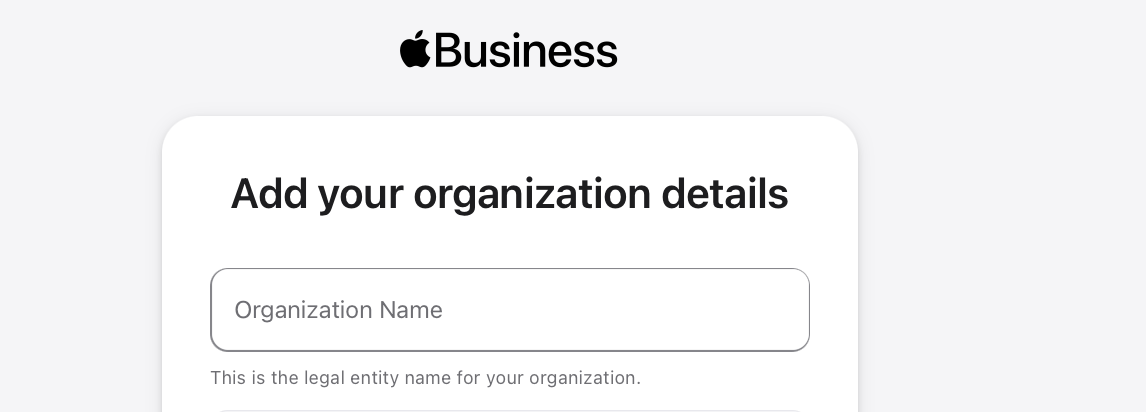
Add your organization details
The legal entity name and the rest of the record. Then it goes to review — around five business days.
Read that as a range, not a promise. Verification runs on Apple's cadence, in batches; a request filed just after one batch closes waits for the next. Nothing you do makes it faster, so file early.
Turn on Custom Apps
Sign in as an Administrator. Select your name at the bottom of the sidebar, open Preferences, and enable custom apps.
This one is quiet and decisive: with it switched off, a private app assigned correctly to your organization simply never appears.
Accept the Apps and Books terms
This is not in the store — it is in your account. Select your name at the bottom of the sidebar, then Preferences → Payments & Billing → Apps and Books, and accept the terms there. Administrator or Content Manager privileges required.
Until they are accepted, no content deploys — free custom apps included. The agreement itself is Apple's Volume Content Terms, the successor to the old Volume Purchase Program terms.
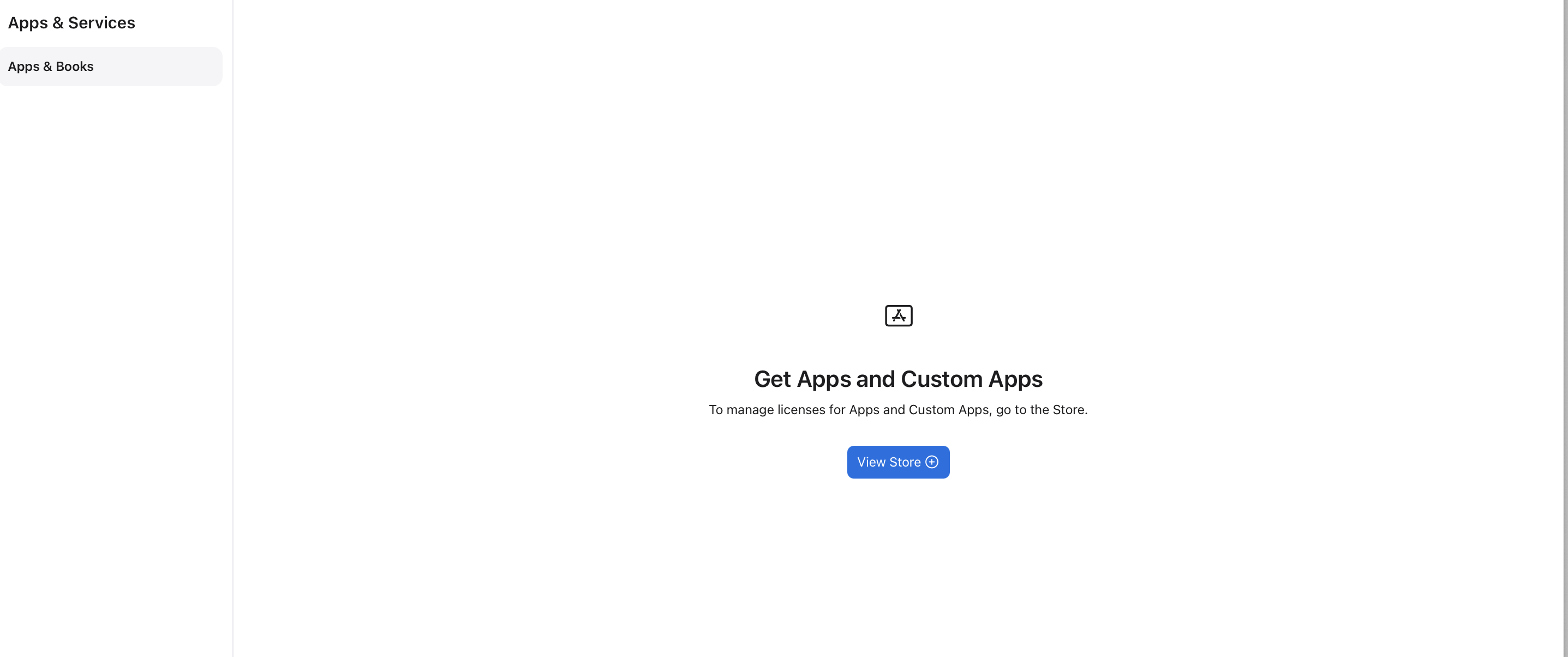
Where the app turns up
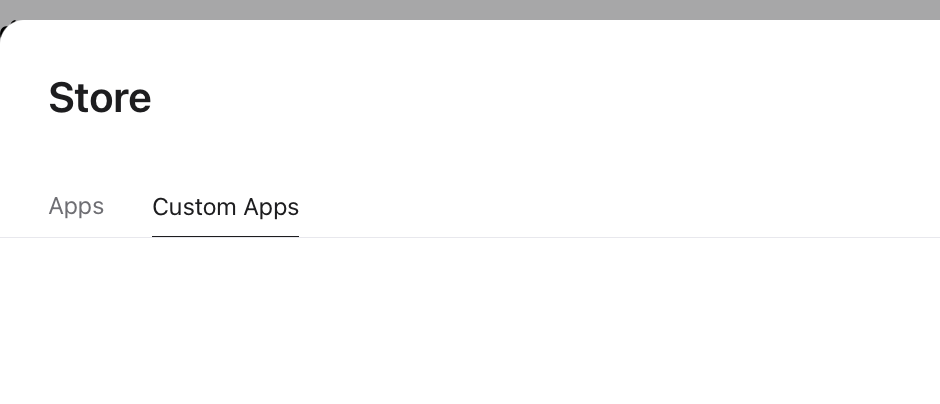
Terms accepted, the app arrives somewhere else entirely: Apps and Books → Store → View Store → Custom Apps.
Then send us one number
Your Organization ID. Signed in as an Administrator, select your name at the bottom of the sidebar, open Preferences → Enrollment Information, and it is listed under Organization Information.
That number is the whole handshake. We add it on our side, the application shows up under Custom Apps, and your people install it. Five steps and one identifier — that is the entire preparation.
How your team gets it
Private does not mean single-copy. Once the app is listed under Custom Apps you take licences for it — ours are priced at €0.00, so the only decisions are how many, and which organizational unit holds them. Apple then offers two ways to pass those licences on.
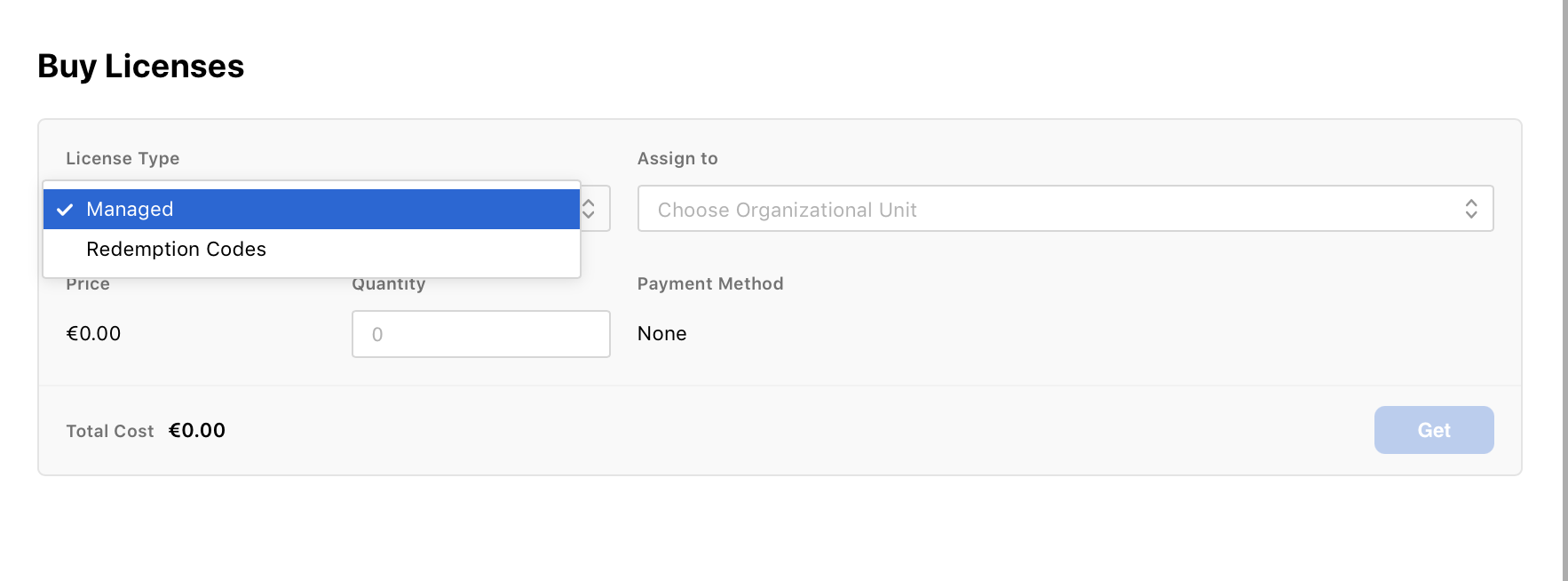
Managed
The licences stay the organization's. You assign them to people or devices through your MDM, and when someone leaves you revoke the seat and hand it to the next person.
The right answer if you already run MDM: the app arrives on the device without anyone having to do anything, and the seat count stays under your control.
Redemption Codes
One-time codes you distribute yourself — email, message, however your team already communicates. The person redeems the code with their Apple Account and the app installs.
The route for organizations with no MDM, at one cost: a redeemed code is spent. It cannot be reclaimed or reused, so a seat leaves with the person who redeemed it.
Either way the app stays private. It is never listed in the App Store, never returned by a search, and cannot be installed by anyone you have not handed a licence or a code to — sharing it with fifty colleagues does not make it public, it makes it deployed.
What can still delay it
The app is in review
Custom apps go through App Review like any other. While a build is in review on our side, it is not assignable — and there is a harder constraint behind it: in App Store Connect, private distribution to an Organization ID has to be set before a build is approved. A build already approved down another route cannot be redirected to your organization after the fact.
An agreement is pending
Apple reissues its terms periodically, and deployment stops until someone accepts the new version. The symptom looks exactly like "the developer hasn't added us yet": an empty Custom Apps tab. Check Preferences → Payments & Billing → Apps and Books first — the acceptance lives in your account settings, not in the store where the app is missing, which is why it is easy to miss.
Propagation
With everything correct on both sides, a newly assigned app still takes time to surface in your Store. Give it a day before treating it as a fault.
Your country
Apps and Books is not available in every country or region. Worth checking yours against Apple's availability list before you start, rather than after step five.
Between speed and patience
Nothing standing between us and an onboarded organization is a build problem any more. What is left is verification queues and integrations with third parties — and talking to an external system means respecting its calendar, not ours.
That is the honest reason we publish the preparation before the invitation. The two months we gained are only gained if you spend them.
30 September is now just a calendar date that has already been surpassed by positive expectation. What falls between here and there is perfectionism — the kind of work that does not move the needle. The job is never finished. The system is.
Work intended to buy back more time for the customer and for ourselves.
Sources Volume Purchase and Custom Apps · Custom app distribution · Apps and Books payment and billing · Availability of Apple programs and payment methods · Apple Developer Forums — custom app not showing in Apple Business Manager
Onboarding opens 1 August
Join the waitlistSinais · anúncio
Preparação do onboarding — concluída dois meses antes do previsto
Anunciámos todos os prazos com antecedência, e cumprimo-los como anunciado.
| Data | O que estava previsto | Resultado |
|---|---|---|
| 15 de junho de 2026 | Canais Telegram | Entregue |
| 5 de julho de 2026 | A app mobile | Entregue |
| 30 set 2026 | O sistema completo | 1 de agosto |
A app mobile é a peça de software mais acabada que temos — perto de um estado em que não resta nada que os programadores quisessem mudar. Está no seu melhor para operadores que precisam de uma decisão depressa: abrir, conversar, pedir uma app, receber a coisa.
30 de setembro nunca foi uma estimativa de construção. Era margem para deixar tudo amadurecer e ser testado como deve ser. Por isso a surpresa não é a data aguentar — é já não precisarmos dela.
A partir de 1 de agosto de 2026, a tunbru está pronta — como empresário em nome individual, com capacidade de faturar — para fazer o onboarding de novas organizações.
O que significa que o trabalho que resta são contratos, não código. E o onboarding tem dois lados: o nosso e o seu. O seu pode começar já, antes de sequer falarmos — porque as partes lentas não são nossas para acelerar.
Cinco passos, antes de nos encontrarmos
Tudo o que se segue acontece em business.apple.com — o Apple Business Manager, agora com a marca simplesmente Apple Business. Reserve dois meses para isto e ficará confortável; a maioria das organizações precisa de muito menos.
Obtenha um número D-U-N-S
A sua organização precisa de um para se inscrever. É gratuito, e a Apple tem uma ferramenta de pesquisa que lhe diz se já tem um. Se tiver, este passo não lhe custa mais do que uma pesquisa. Se não tiver, faça o pedido e conte com até cinco dias úteis.
Inscreva a sua organização
Candidate-se em business.apple.com com o email de trabalho da sua organização. A Apple verifica o endereço e a pessoa por trás dele.
Adicione os dados da sua organização
O nome da entidade legal e o resto do registo. Depois segue para revisão — cerca de cinco dias úteis.
Leia isso como um intervalo, não uma promessa. A verificação corre ao ritmo da Apple, em lotes; um pedido submetido logo depois de um lote fechar espera pelo seguinte. Nada do que fizer a acelera, por isso submeta cedo.
Ative as Custom Apps
Inicie sessão como Administrador. Selecione o seu nome no fundo da barra lateral, abra Preferences e ative as custom apps.
Este passo é discreto e decisivo: com a opção desligada, uma app privada corretamente atribuída à sua organização simplesmente nunca aparece.
Aceite os termos de Apps and Books
Isto não está na loja — está na sua conta. Selecione o seu nome no fundo da barra lateral, depois Preferences → Payments & Billing → Apps and Books, e aceite aí os termos. São necessários privilégios de Administrador ou de Content Manager.
Até serem aceites, nenhum conteúdo é implementado — custom apps gratuitas incluídas. O acordo em si são os Volume Content Terms da Apple, o sucessor dos antigos termos do Volume Purchase Program.
Onde a app aparece
Termos aceites, a app chega a um sítio completamente diferente: Apps and Books → Store → View Store → Custom Apps.
Depois, envie-nos um número
O seu Organization ID. Com sessão iniciada como Administrador, selecione o seu nome no fundo da barra lateral, abra Preferences → Enrollment Information, e está listado em Organization Information.
Esse número é todo o aperto de mão. Nós adicionamo-lo do nosso lado, a aplicação surge em Custom Apps, e as suas pessoas instalam-na. Cinco passos e um identificador — essa é toda a preparação.
Como a sua equipa a recebe
Privada não significa cópia única. Assim que a app está listada em Custom Apps, obtém licenças para ela — as nossas têm preço de 0,00 €, por isso as únicas decisões são quantas, e que unidade organizacional as detém. A Apple oferece então duas formas de passar essas licenças adiante.
Managed
As licenças continuam a ser da organização. Atribui-as a pessoas ou dispositivos através do seu MDM e, quando alguém sai, revoga o lugar e entrega-o à pessoa seguinte.
A resposta certa se já usa MDM: a app chega ao dispositivo sem ninguém ter de fazer nada, e o número de lugares fica sob o seu controlo.
Redemption Codes
Códigos de utilização única que distribui você mesmo — email, mensagem, seja como for que a sua equipa já comunica. A pessoa resgata o código com a sua Conta Apple e a app instala-se.
A via para organizações sem MDM, com um custo: um código resgatado está gasto. Não pode ser recuperado nem reutilizado, por isso o lugar vai-se embora com a pessoa que o resgatou.
Em qualquer dos casos, a app continua privada. Nunca é listada na App Store, nunca é devolvida por uma pesquisa, e não pode ser instalada por ninguém a quem não tenha entregado uma licença ou um código — partilhá-la com cinquenta colegas não a torna pública, torna-a implementada.
O que ainda a pode atrasar
A app está em revisão
As custom apps passam pelo App Review como qualquer outra. Enquanto uma build está em revisão do nosso lado, não é atribuível — e há uma restrição mais dura por trás: no App Store Connect, a distribuição privada a um Organization ID tem de ser definida antes de uma build ser aprovada. Uma build já aprovada por outra via não pode ser redirecionada para a sua organização depois do facto.
Um acordo está pendente
A Apple reemite os seus termos periodicamente, e a implementação para até alguém aceitar a nova versão. O sintoma parece exatamente "o programador ainda não nos adicionou": um separador Custom Apps vazio. Verifique primeiro Preferences → Payments & Billing → Apps and Books — a aceitação vive nas definições da sua conta, não na loja onde a app está em falta, e é por isso que é fácil de escapar.
Propagação
Com tudo correto dos dois lados, uma app recém-atribuída ainda leva tempo a surgir na sua Store. Dê-lhe um dia antes de tratar o caso como avaria.
O seu país
Apps and Books não está disponível em todos os países ou regiões. Vale a pena verificar o seu na lista de disponibilidade da Apple antes de começar, em vez de depois do passo cinco.
Entre a rapidez e a paciência
Nada do que está entre nós e uma organização com onboarding feito é já um problema de construção. O que resta são filas de verificação e integrações com terceiros — e falar com um sistema externo significa respeitar o calendário dele, não o nosso.
É essa a razão honesta pela qual publicamos a preparação antes do convite. Os dois meses que ganhámos só são ganhos se os gastar.
30 de setembro é agora apenas uma data no calendário que já foi ultrapassada pela expectativa positiva. O que cai entre aqui e lá é perfeccionismo — o tipo de trabalho que não move a agulha. O trabalho nunca está terminado. O sistema está.
Trabalho destinado a recomprar mais tempo para o cliente e para nós próprios.
Fontes Volume Purchase and Custom Apps · Distribuição de custom apps · Pagamentos e faturação de Apps and Books · Disponibilidade de programas Apple e métodos de pagamento · Apple Developer Forums — custom app não aparece no Apple Business Manager